For an agency, the office software is half the story. The other half is the app your workers use every week. Here's what they see in Varisett Staffing.
Signing up
The agency sends a link, or the worker registers on the agency's own page. They choose a six-digit PIN, and from then on sign in with their Worker ID and PIN. There's nothing to download: it runs in the phone's browser.
Onboarding on the phone
The app walks them through it: their details and an emergency contact; how they're paid, PAYE or through an umbrella company; photos of their documents; the agency's terms, accepted by typed name; and the days they can work. They send it in, and the agency's compliance team checks each document.
Shifts offered to them
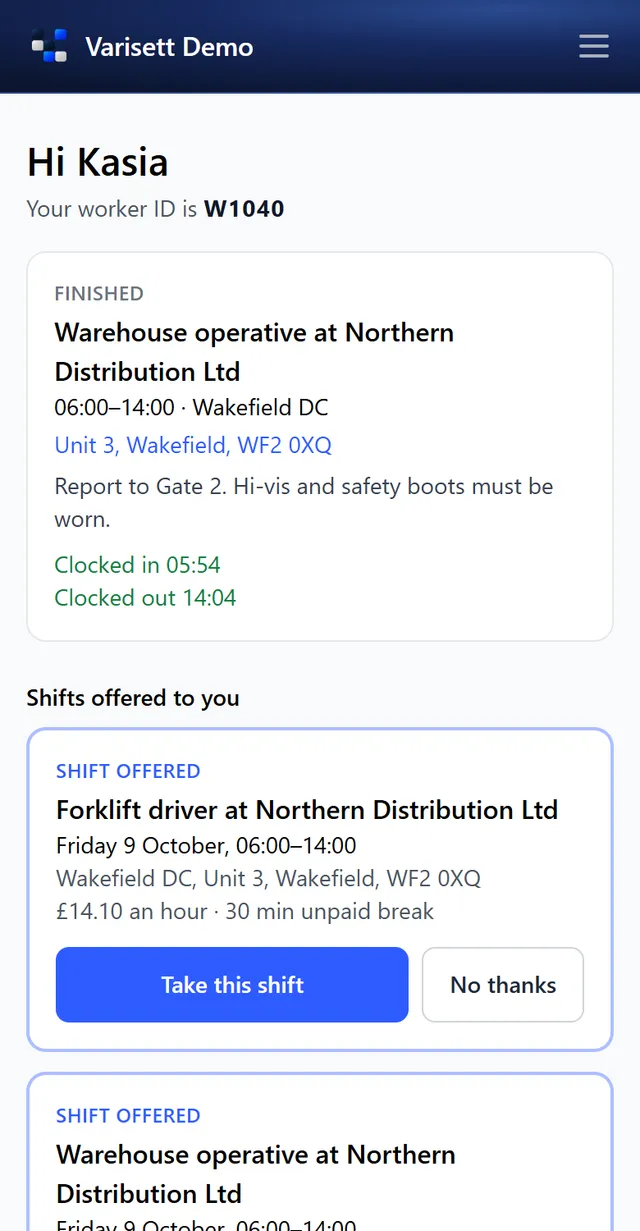
Once cleared and active, shifts offered to them appear on their home page with the client, site, time, pay rate and break. One tap takes it; the first person to accept gets the place, and nobody can be double-booked.
Clocking in
At the site, they clock in and out on their phone. Their location is checked at those two moments only, never tracked in between. If they're further away than the site allows, they give a reason and the office decides.
For the agency
Every clock-in feeds the timesheet the client approves from their own link, and the approved hours feed the pay run and the invoice. Read the full walkthrough in our guides at varisett.com/help/staffing, or see the platform at varisett.com/staffing.